How to Track Belt Progress in a Martial Arts School
Grading day is where belt tracking either works or falls apart.
Maybe a student has trained for months, and nobody noticed they were eligible. Maybe a parent asks where their child stands, and you have to dig through a spreadsheet to answer. Maybe two instructors have two different ideas of what "ready" means.
None of this means you care less about your students. It means belt tracking has outgrown your memory. This guide covers what to track, how to set it up, and how to run grading day without the paperwork.
What belt tracking needs to cover
Belt tracking has to answer four questions for every student. Where are they now? What does the next rank require? How close are they? What has already happened?
- Current rank. The belt and stripe level they hold today.
- Next-rank requirements. What the student must complete to become eligible, such as several classes and a minimum time at rank.
- Progress toward them. Classes attended and time at rank. Reliable attendance tracking keeps this accurate.
- Promotion history. The date of every promotion, so a student who returns after a break keeps their full record.
Attendance shows commitment, not skill. A student can attend every class and still need work on technique. That is why eligibility should tell you who to look at, and the instructor should decide who is promoted.
Write down what each rank requires
Before you pick a tool, write down what each rank requires. Include the number of classes, any minimum time at rank, and anything else your school expects. Kids and adults often follow different paths, so decide that up front. Make sure every instructor reads "ready to test" the same way. When two instructors apply two standards, students notice.
In 1club, you build these rules into the progression itself. Start from a ready-made belt track or create your own, with your own belts and stripes. For each rank, set the number of classes and the days a student must train before they become eligible. You can also choose which class types count toward a progression, so a kids class does not count toward an adult belt. A student can follow more than one progression.
Once the rules are in the system, nobody has to keep them in their head.
Know who is ready before grading day
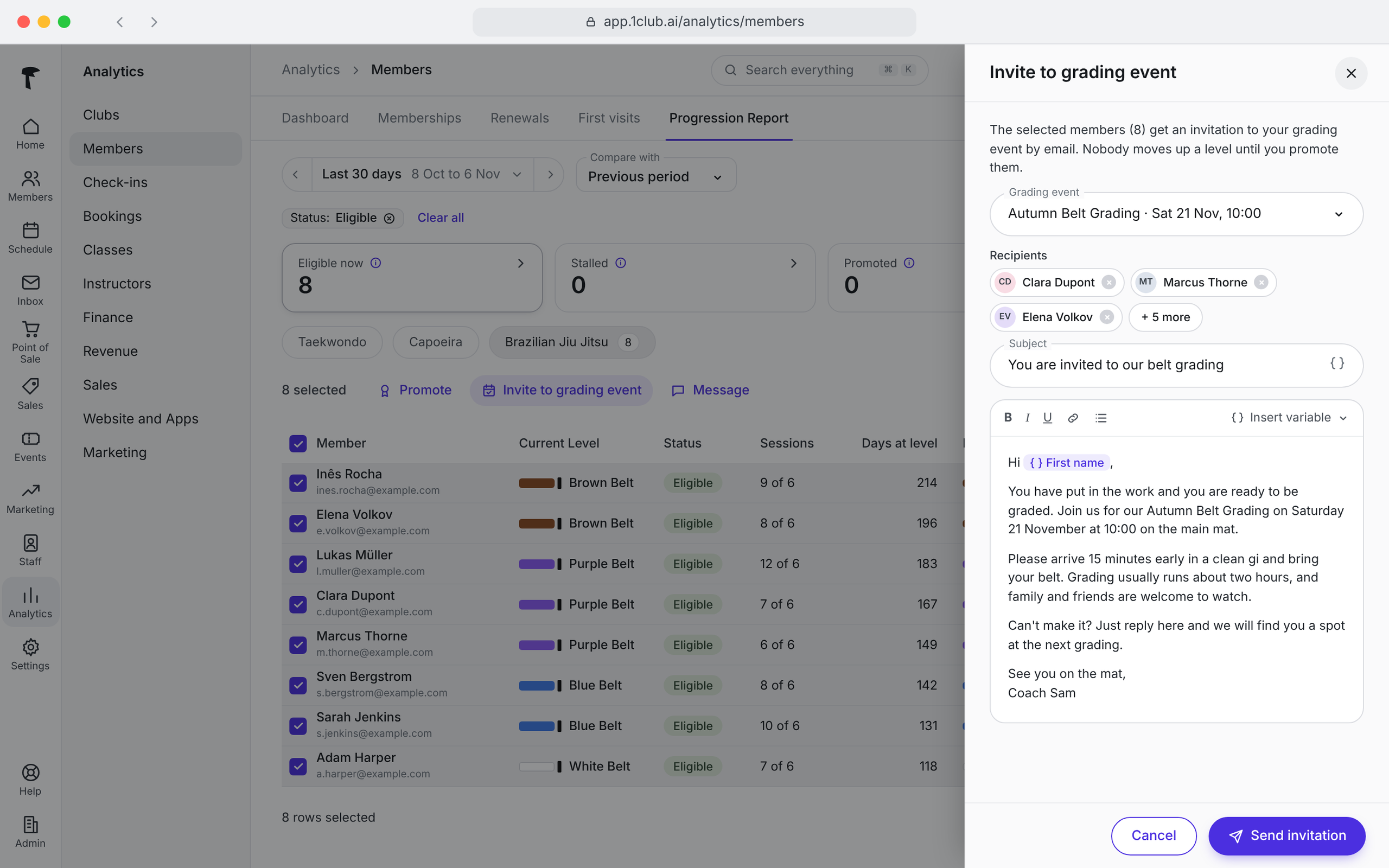
Instead of scanning every profile, open the ready-to-grade report. It lists every student who meets the requirements for their next rank.
From the report, you can do two things. You can promote students straight away, or you can send them a message. Most schools use the message to invite eligible students to a grading event. If you run grading events, including events with a fee, you can set those up in 1club too.
A short invite is enough. For example: "Hi Sam, you have met the requirements for your next stripe. Our next grading is on Saturday at 10:00. Please let us know by Thursday if you can make it."
Seeing the list early gives you time to check technique and decide who is truly ready. It also means no eligible student gets missed.

Alt text: Ready-to-grade report listing students eligible for their next belt.]
Promote students on the mat
The best place to promote a student is in front of their class. 1club lets you do it there. At the end of class, open the list of everyone who is eligible, select one or more students, and promote them with one tap.
On grading day, you can promote the whole group the same way. There is no admin work to do afterwards. Each promotion is saved in the student's history, and their profile shows the new belt.
You stay in control. The list shows who is eligible. You decide who gets promoted.

Let students and parents see progress
Students stay motivated when they can see where they stand. Many students drift away when they stop feeling progress, even if they like the school.
Research supports this. A meta-analysis of 138 studies with almost 20,000 participants (Harkin et al., Psychological Bulletin, 2016) found that monitoring progress toward a goal raised the chance of reaching it. The effect was larger when progress was recorded or shared. Most of those studies covered health goals, not martial arts, but the principle carries over.
In 1club, a student's belt shows on their profile in the member portal and in the mobile app. Parents see it through their family account. When a student is promoted, the student or parent gets an email and a push notification straight away. It shows the new rank and the previous one.
Parents hear about the promotion as it happens, not at the next pickup.


What to look for in belt tracking software
Whatever you use, check that it can do these five things.
- Use your own ranks. Your belts, stripes, and levels, not a fixed template.
- Set requirements per rank. Classes and time at rank, so eligibility is not a guess.
- Show who is ready. A list you can act on before grading day.
- Promote quickly. Several students at once, with the history saved.
- Keep families informed. Students and parents can see belts and hear about promotions.
1club's martial arts software covers all five.
Common belt tracking mistakes
- Promoting on attendance alone. Classes attended show commitment, not skill. Use eligibility as a flag and keep the decision with the instructor.
- Keeping standards in your head. If the requirements live with one instructor, students at the same rank get different answers. Write them down.
- Finding out too late. A student who met every requirement months ago and was never noticed may already be thinking of leaving. Check the ready list regularly.
- Telling families afterwards. If parents have to ask, they hear late. Let them know when the promotion happens.
- Losing the history. A spreadsheet nobody updates drops promotions. Keep one record per student.
Frequently Asked Questions
Can I use my own belts and stripes in 1club?
Yes. You can start with a ready-made belt track or create your own. Stripes work as levels, so a rank like Purple Belt, 4 Stripes is tracked as its own step.
Does attendance decide who gets promoted?
No. You set the classes and time at rank a student needs to become eligible, and 1club shows who qualifies. You decide who is actually promoted.
Can I promote several students at once?
Yes. Select one or more eligible students and promote them with one tap. Many schools do this at the end of class or on grading day.
Can parents see when their child is promoted?
Yes. Parents get an email and a push notification when a promotion happens. The belt also shows on the student's profile in the member portal and mobile app.
Which plans include belt tracking?
Belt tracking is included in the Run and Grow plans. See the pricing page for current plans.
Good belt tracking gives you back grading day. You know who is ready, you promote them on the mat, and their families hear about it right away. See how it works in 1club: Start free.

Martin is a go-to-market executive, fitness enthusiast, and competitive basketball player. He's built and scaled global revenue teams at B2B SaaS companies, growing organizations from early stage to $15M+ in revenue. A lifelong athlete, Martin stays active through CrossFit, gym training, basketball, and snowboarding. At 1club, he's leading the go-to-market strategy and execution.